 OS
One C source.
Windows now,
Impossible OS next.
A small C kit for Windows programs. A program is an ordinary 64-bit .exe with no C runtime. It calls only the 153 Windows functions on one published list, and Impossible OS is building that same list.
Make your first windowRead the API
Early, no release yet. Programs run on Windows today.
 Hello
#include <impossible/base.h>

int im_main(void) {
    return im_print("Hello from Impossible SDK\n") ? 0 : 1;
}
cmake_minimum_required(VERSION 4.0)
project(Hello LANGUAGES C)
include("${IMPOSSIBLE_SDK_DIR}/cmake/ImpossibleSDK.cmake")
impossible_add_program(Hello CONSOLE TIER 0 SOURCES src/main.c)Start in four commands
Windows or WSL on 64-bit x86, with Python 3.12 or newer. The compiler, CMake and Ninja are pinned by version and hash, so Windows and WSL build with the same tools.
git clone https://github.com/rizonesoft/ImpossibleSDK.git
cd ImpossibleSDK
python tools/bootstrap.py    # installs the pinned toolchain, once per machine
python tools/build.py        # builds into build/<host> and runs the tests
Pick a tier, and that is all a program can call
A program names the highest of 6 tiers it needs. Each drawer includes the ones above it. The build reads the finished program and fails on anything else. The whole list
Compared with the real thing, pixel by pixel
Impossible UI draws Windows 11's controls in portable C: no system call, no floating point, no C library. Values come from WinUI 3's MIT source at a pinned commit. Drag to compare.
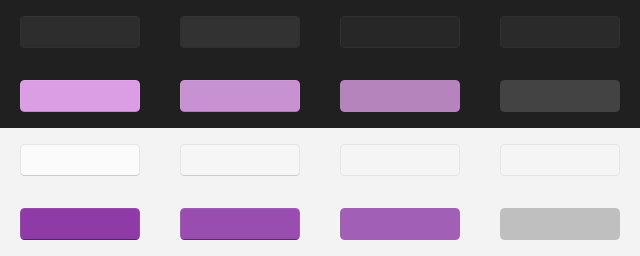
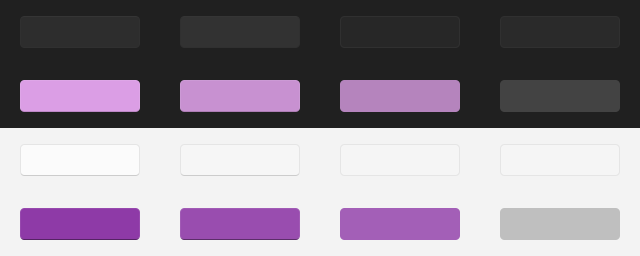
Standard and accent buttons at rest, hovered, pressed and disabled, dark and light, in the accent colour of the test machine. Straight edges and fills may differ by 1 of 255; corners have their own limit.
What works today
| Area | State | What you get |
|---|---|---|
| Start-up, memory, text, files, console | Works | base.h, text.h, file.h: UTF-8 everywhere, safe file replacement |
| One window | Works | window.h: a canvas of pixels, pointer, keys and DPI |
| Import check | Works | check_imports.py, run on every program |
| Pinned toolchain | Works | llvm-mingw, CMake and Ninja by version and hash, the same on Windows and WSL |
| Impossible UI: drawing, theme, button | Works | Light, dark and contrast values, smooth corners, the button, compared with real WinUI |
| Impossible UI: engine and text | Planned | Interface engine and text engine |
| Impossible UI: controls and dialogs | Planned | Controls, more controls and dialogs |
| Picture formats, shared parts | Planned | Formats and shared parts |
| Network: TLS, HTTP, kept secrets | Planned | Network |
| Web readers: HTML and CSS | Planned | Web |
| Clipboard, input methods, screen readers, sound, settings | Planned | Windows services |
| Printing | Planned | Printing |
| Installer, first release | Planned | Parts and release |
Each row that works names the tests that prove it, and they pass before this page is published. See the whole plan
Made for Impossible OS, useful without it
Every function on the list becomes a section of the operating system's roadmap. Programs and controls are imported there at a pinned commit, and changes come back as pull requests. Neither side waits for the other.
- The list153 functions in 6 tiers
- Your programRuns on Windows today
- Impossible OSImports it at a pinned commit